
- Routing Number: 065204579
 Routing # 065204579
Get our App:
If you experience any difficulties, or need immediate assistance with Bill Matrix, please call our call center at 800-789-5159 during the hours of 8am-6pm Monday-Friday, or Saturday from 9am-Noon. All times are CST.

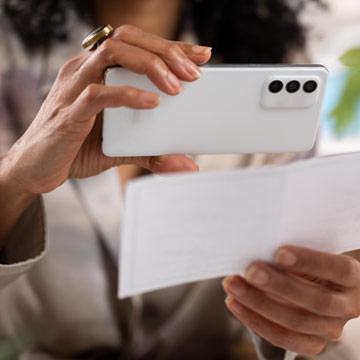
Mobile Deposit
Deposit checks in a snap.
Deposit checks on the go with smartphone-enabled Mobile Deposit from JD Bank. Created for convenience and security, Mobile Deposit allows you to deposit checks though your mobile banking app. No stop at a branch or ATM required.
Mobile Deposit FAQs
Mobile Deposit Capture lets you deposit checks quickly and easily from an iPhone, Android phone, or iPad into a deposit account. Using the camera function on your device, simply take a picture of the front and back of your check.
Convenience is the major benefit for this service. Mobile Capture allows you to make a deposit at any time.
Mobile Deposit Capture is available to any personal or business account customer who has an iPhone, Android phone, or iPad and is enrolled in Online & Mobile Banking.
There is no fee associated with Mobile Banking.
The back of all checks deposited in a consumer account must be endorsed with your signature. The back of all checks deposited in a non-consumer account must be endorsed with the Business Name. These endorsement requirements, along with the standard check completion requirements detailed below, must be met for any and all checks to be accepted through the Mobile Deposit feature on the JD Bank Mobile Banking app. Standard check completion requires the following fields be completed accurately and entirely:
If you are already using Mobile Banking on your iPhone, Android phone, or iPad, then you may access the Mobile Capture feature by selecting the Deposit Menu item once you log into your Mobile Banking. If you don't see the Deposit feature in Mobile Banking, please call your local branch to have the service activated. If you're not currently accessing Mobile Banking, just download the JD Bank app from the Apple App store or Google Play store on your mobile device. Your Online Banking login credentials will be required along with a challenge question. Once these steps are completed, you're ready to use Mobile Banking.
Checks made payable to you drawn on a bank within the United States can be deposited through Mobile Deposit Capture. The following types of checks cannot be deposited through Mobile Deposit Capture and must be presented within a branch office:
You may make a mobile deposit by logging into Online Banking through the app on your mobile device.
Only one check per deposit is allowed.
Once you select the account to deposit funds to, your mobile app will display your daily and monthly dollar limits for that specific account. Please note that different accounts may have different dollar limits based on your previous account history.
Once you select the account to deposit the funds to, the mobile app will display the volume of checks you're allowed to deposit on a daily and monthly basis. Please note that different accounts may have different volume limits based on your previous account history.
No, deposit limits are set based on account activity and prior history.
You may verify your item was submitted by viewing the Deposit History details on the app.
Deposits are made available generally within two (2) business days. You may review your account history to verify the item has posted to your account.
After you verify that we've received and accepted the item, as reflected by the “Delivered” icon located directly to the left of the “Deposit History” details on the app, and after you verify that the item has posted to your account, you must securely store the original check for five (5) business days after transmitting the image to us. Promptly after the five-day period expires, you'll destroy the original check by first marking it “VOID” and then destroying it by cross-cut shredding or another commercially acceptable means of destruction.
Delivered: Your item has been reviewed and processed, and you may review your account history to verify the item has posted to your account.
Rejected: Your item was rejected. You may 1) review for cause and make necessary correction(s) or 2) bring the item to any branch office for review/deposit.
Submitted: Your item has been submitted but has not posted to your account at this time. You may check Deposit History at a later time to review your deposit status.
Pending: Your item is under review and has not been accepted at this time. You may check Deposit History at a later time to review your deposit status.
Other: Your item has not been accepted, rejected, or reviewed at this time. You may check Deposit History at a later time to review your deposit status.
Please call 1-800-789-5159 or any JD Bank branch.
 Banking Perks


Overdraft Protection
Overdrafts happen. Your check goes through before your deposit. Or you miss a debit in your account. Don't stress it. We've got you covered with Overdraft Protection™ from JD Bank.


 Compare Accounts